You can configure drillthroughs at a data source level so that you don't have to set up them individually for every report. You can use rules to define which drillthroughs are applied to which fields. For example, you can do the following:
How do I customize drillthroughs for the data source?
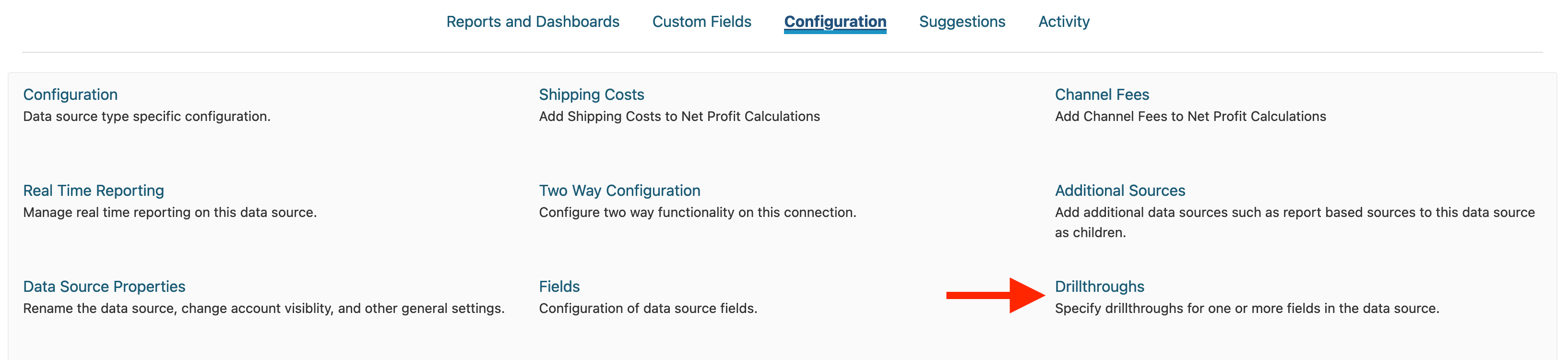
Navigate to the data source you want to define the rule against on the Home page. Click on Configuration, then click on Drillthroughs:
How do I define a drillthrough?
Click on Add Drillthrough on the Drillthroughs page. Clicking on this button will pop up a window which enables you to define the drillthrough. You'll need to specify certain criteria to determine which drillthroughs are associated to which fields.
if (field matches this criteria) (perform this action on the field) (details of the action)
Available criteria are:
All Fields -- apply this drillthrough to all fields. You can use this setting to set a default drillthrough for your data source if nothing else matches.
Field is part of data source X -- for example, if the field is part of the Purchases data source, set the drillthrough report to Purchase Order List.
Any field in report is part of data source X -- if the report contains any fields that are part of the Purchases data source, set the drillthrough report to Purchase Order List. For example, if you have a report showing Purchases by Product, the drillthrough would go to purchases in this case even if you click on the product.
Field is tagged as X -- if the field has been tagged as a Procedure, set the drillthrough report to Procedure List.
Field is named X -- if the field is 'View Order in Inventory System', set a URL link to 'Inventory Order URL'.
Field is of type X (grouping, date, measure) -- if the field is a date, set a drillthrough to a specific date comparison report.
Field is from a data source with a name containing X -- if the field is from a data source containing 'ProductionOrder' in its name, set the drillthrough to a manufacturing drillthrough.
Any report with a category set to X -- if the report has been set with the specified category name under Configuration -> Report Properties -> Report Processing -> Field Rule Category, add this drillthrough. For example, our templates for COGS analysis use the 'Cost' field rule category so that they can go to a specific drillthrough.
The different criteria are applied sequentially, so whatever the last matching criteria is will be used for a given field when it's determining what drillthrough to use.
How do I configure the drillthrough itself?
For more information on actually configuring drillthroughs, please see Linking Reports.